Who is visiting my website? What you can (and can't) see
No tool will hand you the names of anonymous visitors — anyone promising that is selling trouble. What you can see: sources, journeys, company names on B2B traffic, and everything, once someone signs up.
The short answer: not by name
Web analytics counts visitors without identifying them. A stranger reading your pricing page appears as a browser in a country running a device — no name, no email, no face. That's by design: browsers actively restrict cross-site identification, and privacy law in most jurisdictions treats de-anonymizing strangers as a violation, not a growth tactic.
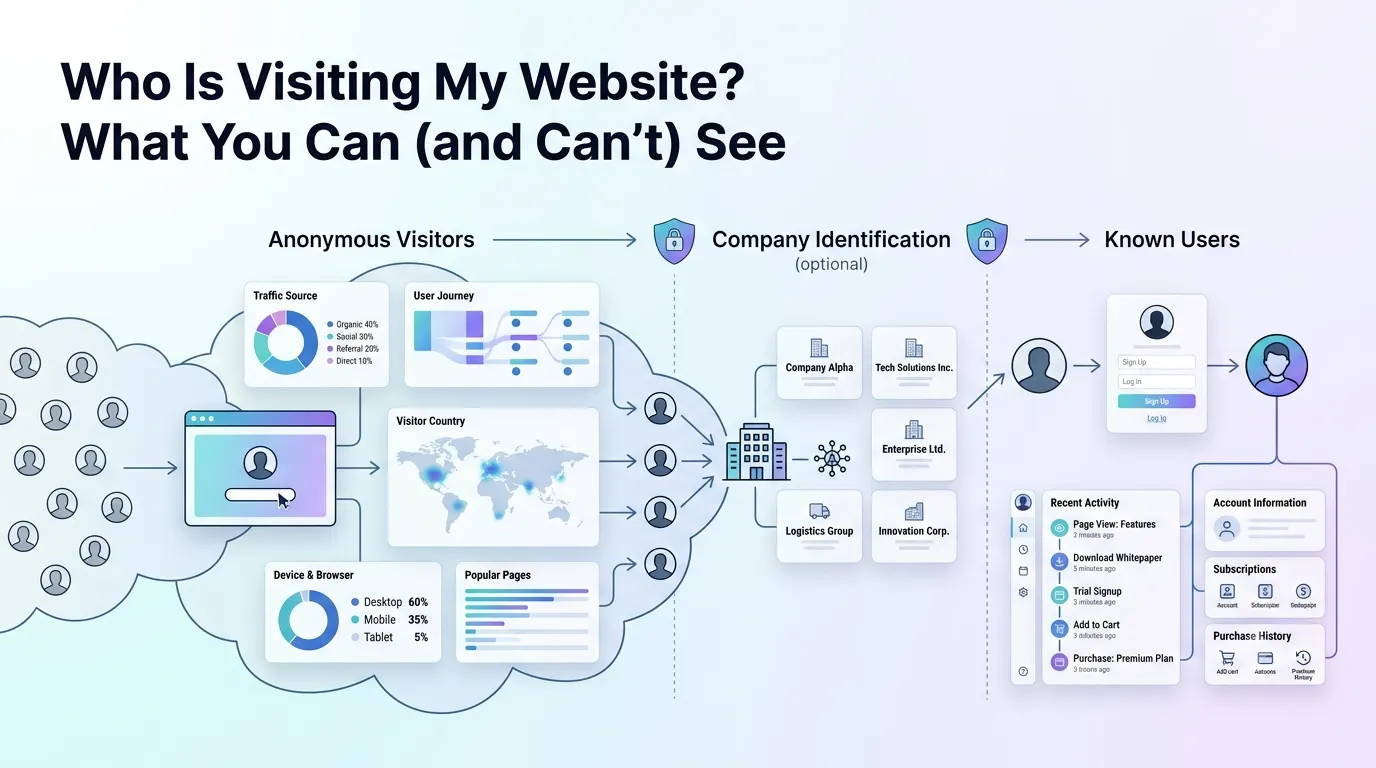
So the reframe: 'who is visiting my website' has three answerable versions. What kind of visitors — fully answerable. Which companies — partly, for B2B traffic. Which individuals — only after they identify themselves. Each version has its own tooling.
What you can know about anonymous visitors
Plenty, in aggregate. Where each visit came from — the source, down to the exact campaign if links are tagged. The path: entry page, pages read, actions taken, exit. Rough geography (country, usually city), device and browser. And with session replay, behavior itself — watching an anonymous visitor hesitate over a pricing table teaches more than most identified data would.
For most site questions this is the whole job. 'Who visits' is usually a proxy for 'are these the right people', and audience shape, sources and behavior answer that without a single name.
How B2B visitor-identification tools work
The category promising more — Leadfeeder, Clearbit-style enrichment, Salespanel and dozens of similar products — works by reverse IP lookup: office networks own identifiable IP ranges, so a visit from Acme Corp's headquarters can be labeled 'Acme Corp'. That's the company, never the person, and 'someone at Acme viewed pricing three times this week' is genuinely useful signal for a sales team.
The catch: it only works when the visitor sits on a company network. Home offices, phones and coffee shops resolve to consumer ISPs — a growing majority of all traffic — so match rates run low, and the tools earn their fee only when a sales team will act on the minority of visits that do resolve.
Individuals: only after they identify themselves
The moment a visitor signs up, logs in or clicks a link in your email, identification becomes both possible and fair game — they've told you who they are. Mechanically it's one call: identify the user to your analytics and pass the properties you hold (name, email, plan, company), and their sessions attach to that profile instead of an anonymous counter. From then on the dashboard shows the person, with consent and a privacy policy doing the paperwork. In Bigdelta this is where the interesting joins happen: an account's visits, events and revenue sit in one timeline.
This is the legitimate version of what the question is usually reaching for — knowing who the engaged visitors are. Getting there takes no surveillance, just a reason for visitors to introduce themselves: a signup, a newsletter, a demo booking.
The line not to cross
Services exist that claim to unmask anonymous visitors as individuals, matching your traffic against purchased identity graphs to return names and emails of people who never gave them. In GDPR jurisdictions that is straightforwardly unlawful; in the US it collides with state privacy laws and email rules, and the contact data arrives poisoned anyway — emailing someone because they anonymously read your pricing page generates spam reports, not pipeline.
The disclosure duties run the other way too: session recording and any identified tracking belong in the privacy policy, and replay tools should mask inputs by default.
The practical takeaway
You can't see who anonymous visitors are, and the products claiming otherwise are either company-level (legitimate, B2B, partial) or person-level (avoid). What is available covers nearly every real need: sources and behavior for anonymous traffic, company names on office-network visits, and full identification the moment someone signs up. Instrument those three layers and the question stops needing the forbidden answer.