Server-side vs client-side tracking, explained without jargon
Almost every analytics tool works the same way: a script in the visitor's browser reports back what happened. Server-side tracking moves that reporting to a computer you control — which is why ad blockers can't stop it, and why it costs real money to set up. Here's how both work, what switching actually recovers, and when it's worth it.
The difference in one paragraph
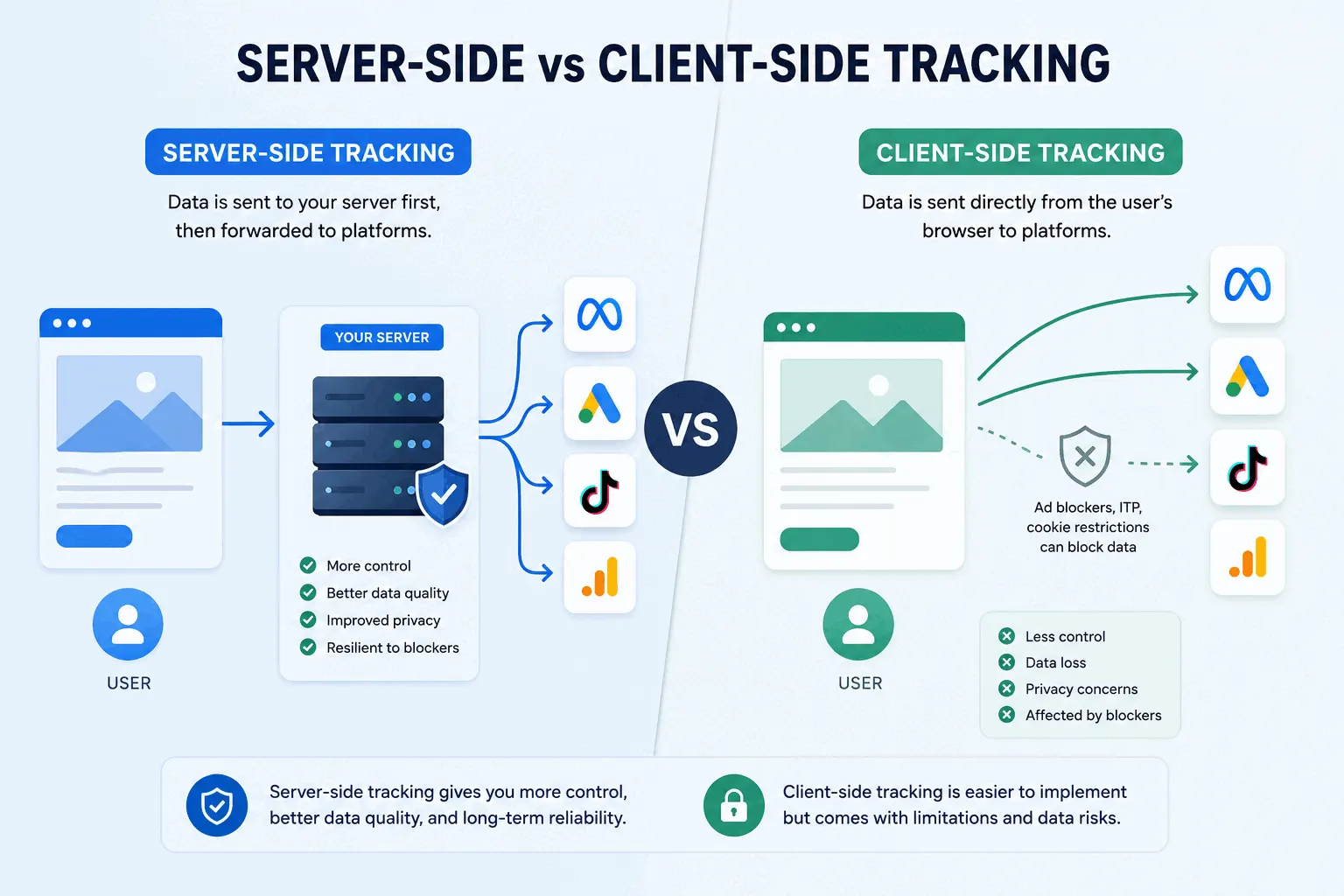
Client-side tracking means the visitor's browser sends the data: a script on your page watches what happens and reports it to your analytics tool, your ad platforms, and whoever else you've installed. Server-side tracking inserts a middleman you own — the browser reports once to your own server, and your server passes the data along from there. That one change is the entire difference, and everything else follows from it: requests from your own domain don't look like tracking, so ad blockers let them through; but a server is infrastructure, so somebody has to build and pay for it. For most small sites, client-side is fine. Once you're spending serious money on ads and losing a third of your conversion data to blockers, the math changes.
How client-side tracking works
When you add an analytics tool to your site, you paste a snippet of JavaScript into your pages. That script runs inside each visitor's browser. It notes the page view, the clicks, the purchase, and sends each event straight from the browser to the tool's servers — google-analytics.com, connect.facebook.net, and so on. Every tool you install sends its own separate reports.
This design is why analytics is easy to set up. It's also why it's easy to block. Ad blockers work from public lists of known tracking domains, and every major analytics and ad domain is on them. When the browser is about to send data to a listed domain, the blocker stops the request — or stops the script from loading at all. Roughly 30% of internet users block ads, more among developer and tech audiences, and browsers like Brave block analytics scripts out of the box. The dark-traffic post covers how much of your audience disappears this way; the short version is: enough to matter.
How server-side tracking works
With server-side tracking, the browser still notices what the visitor does — but instead of reporting to ten different tracking domains, it sends one message to a server you control, usually on your own subdomain, something like data.yoursite.com. That server then forwards the data wherever you want it to go: your analytics tool, Google, Meta, your database.
The subdomain is the trick. To the browser and to ad blockers, a request to data.yoursite.com looks like your website talking to itself — first-party traffic, the same as loading one of your own images. Blocklists can't include every site's own subdomain, so the request goes through. The forwarding to Google or Meta happens later, server to server, where no browser extension can see or stop it.
Vendors in this space publish recovery numbers — benchmark reports from tagging providers claim server-side setups capture 20–40% more conversions than pixels alone, with the biggest gains on Meta campaigns. Treat the exact figures as marketing; the direction is real. If a third of your visitors block client-side scripts, routing around the blocklist recovers most of them.
There's a second, quieter benefit. Safari caps cookies set by JavaScript at seven days, which makes a returning visitor look brand new the week after their first visit. Cookies set by a server can live longer — though Safari has tightened the conditions, and in practice many hosted setups still get capped. Worth having, unreliable to count on.
What server-side tracking doesn't fix
This is the part vendor pitches skim past.
Consent. If a visitor declines your cookie banner, you can't track them, no matter which computer sends the data. GDPR and similar laws regulate the collection of personal data, and they apply identically to a browser request and a server request. Some setups quietly keep collecting after a decline and call it compliant because it's server-side; law firms have started filing cases over exactly that pattern. Moving tracking to a server changes your data pipeline, and it changes nothing about your legal obligations.
Campaign data that never arrives. Safari and Firefox strip tracking parameters like gclid from URLs and referrers before any script sees them. Your server can only forward what the browser gave it, so UTM discipline matters just as much as before.
Checkouts on someone else's domain. If payment happens on Shop Pay, PayPal, or any page you don't control, your tracking — client or server — isn't running there. That gap belongs to the checkout provider, and no transmission method closes it.
Determined blockers. Brave and uBlock Origin have countermeasures for the older tricks in this space, and can catch sloppy server-side setups that just alias a third-party tracker behind a subdomain. A real first-party server is much harder to detect, but 'invisible to all blockers forever' is not a promise anyone can honestly make.
The uncomfortable question
People install ad blockers on purpose. Some want to skip ads; some specifically don't want to be tracked. Server-side tracking counts both groups anyway, and they can no longer see it happening in their browser's network tab. Vendors frame this as measurement accuracy — you're counting visits, and modern tools do it without building advertising profiles. Privacy advocates frame it as overriding a choice the user explicitly made. Both descriptions are accurate, which is why this is a judgment call and not a technical detail. If your audience is developers, assume a meaningful share of them holds the second view about sites that do this.
Where you land probably depends on what the data is for. Counting your own visitors to understand your own site is a different act from rebuilding an ad-targeting profile the visitor tried to block. The infrastructure is identical; the intent isn't.
What it costs, and when it's worth it
The hosting is cheap: managed tagging services start around $19 a month, and running your own on a cloud provider costs about the same. The setup is the real expense. Practitioner estimates for a full server-side migration with an ecommerce conversion flow run 50–120 specialist hours — several thousand dollars, plus two to four weeks of calendar time, plus ongoing maintenance when a platform changes its API.
The rule of thumb in practitioner writeups puts the break-even around $10–15K a month in paid ad spend. Above that, recovered conversion data feeds back into the ad platforms' bidding algorithms, and even a few percent of efficiency covers the setup cost quickly. Below it, you're buying enterprise plumbing for a data problem you could mostly note and move on from — your trends are still directional with client-side data, as long as you know the undercount exists.
A reasonable middle path if you're Meta-heavy: the Conversions API alone, which sends purchase events from your store's backend to Meta without a full tagging-server migration. Shopify and most ecommerce platforms support it natively.
The bottom line
Client-side tracking is a script in the visitor's browser; server-side tracking is a relay through a server you own. The relay defeats blocklists, sometimes extends cookie life, and gives you one place to control what data goes where. It doesn't touch consent law, stripped campaign parameters, or off-site checkouts, and it raises a trust question you should answer deliberately rather than by default. If your ad spend is small, keep the simple setup and read your numbers knowing they're an undercount. If your ad spend is large, server-side stops being optional engineering and starts being the cost of trusting your own dashboard.